


Open Banking vs. CSV Files: A Side-by-Side Comparison for Dynamics 365 Users
Most finance teams running Dynamics 365 ERPs know the monthly rhythm by heart. Someone logs into the bank portal, downloads a statement, saves it as a CSV, edits it, and then reimports it into their ERP. When it works, it works even if it is manual and time consuming. When it does not, a single field can turn a routine close into an afternoon of troubleshooting.
That gap between when it works and when it does not is where most conversations about bank connectivity begin. Teams evaluating Dynamics 365 Business Central and Dynamics 365 Finance want to know whether they are tied to files indefinitely, or whether an alternative such as open banking offers a different way to surface their bank data safely and easily.
What is Open Banking and What Does it Mean for Your ERP?
Open banking is a regulated framework that lets licensed third parties connect directly to a bank through secure APIs, with the account holder's consent, to read transaction data and initiate payments. Instead of exporting a file from your bank and importing it into the ERP, the connection brings transactions and balances straight into Business Central or Finance, and pushes approved payments back out, without a file ever touching the process.
That single distinction drives everything that follows. CSV import is a file-handling manual workflow that is error-prone. Open Banking is a live data connection with tight security measures that eliminate opportunities for fraud or accidental data mishandling. Once you see the comparison through that lens, most of the practical differences explain themselves.
How CSV Imports Work Today, and Why They Fail
ERPs like Business Central handle CSV bank statement imports natively. You define an import format that maps each column in the file to a field such as date, amount, and description, attach it to the relevant bank account, and then follow the same process each period. While manual and vulnerable to fraud, this system can work for smaller companies with a single bank account.
The strain shows as soon as you get beyond the most basic use case. Banks often revise their export formats without notice, conventions that read clearly to a person can fail validation and produce the errors. Statements carry opening and closing balance rows that are not real transactions, and if no one removes them, they distort the reconciliation. Each of these is a minor issue on its own, but spread them across several accounts, two or three currencies, and a month-end deadline, and the minor issues accumulate into hours.
There is also a limit that no amount of careful mapping can fix, which is timing. A CSV is a snapshot of the past. By the moment it is downloaded and imported, the data already trails reality. For a team that needs to know its cash position today rather than as of last Friday, that lag is structural rather than a setting to adjust.
Payments sit on the other side of the same divide. With a file-based process, paying suppliers usually means exporting a payment file from Business Central, logging into a separate banking portal, uploading it, and authorizing the batch there; often within limits the bank sets on how many payments a single file may contain. The reconciliation that follows then has to match those payments back against the ledger by hand.
The Comparison, Side by Side
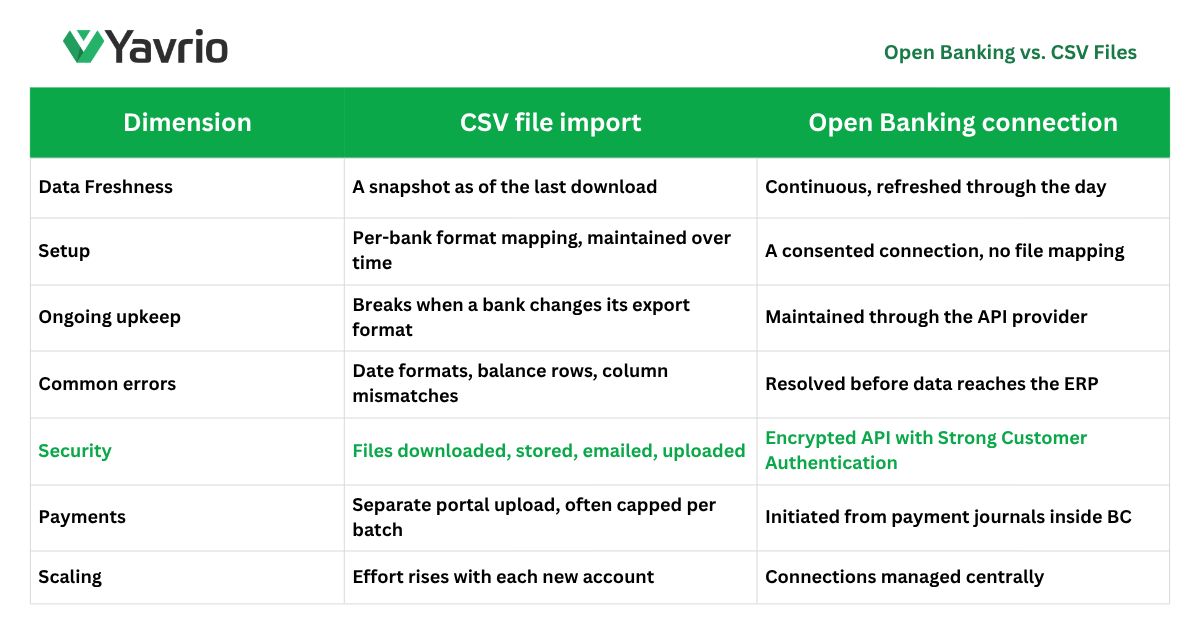
The table below summarizes how file imports and live bank feeds differ across the dimensions finance teams tend to care about most.
Why the Security Row Matters Most
Of the rows in that table, security is the one that warrants a closer look, because files are easy to underrate as a risk. A statement saved to a shared drive, forwarded as an email attachment, or left in a downloads folder is financial data sitting outside any controlled system. Payment files carry more exposure still. Picture a supplier payment batch exported from Business Central: in the window between that export and the moment someone authorizes it in the bank portal, anyone who can reach the file can change a sort code or an account number, and the doctored file still imports cleanly because nothing downstream checks it against the original. That is precisely how invoice-redirection fraud works. Connected banking solutions remove the need for a file, and with it that vulnerability. Data travels over an encrypted connection, payments are confirmed against the intended payee, and access depends on strong aut rather than credentials typed into a portal.
What Scale Does to a File Process
For a small operation with a single account, the case for staying on CSV is reasonable. The friction is tolerable and the volume is low. The math changes as the account count climbs. Yavrio's own customer success stories put numbers on it: Regency Living, a property business reconciling 35 bank accounts, eliminated manual uploads and reclaimed roughly 25 weeks of finance time a year. A figure like that says less about any single import and more about the steady drag a file-based process places on a team that has better things to do.
How to Evaluate It for Your Team
The useful question is not which method is better in the abstract, but which one fits where your finance function is heading. Count how many accounts you reconcile, how often you need a current cash position, how many payments you push each month, and how much time the file process quietly absorbs. If those answers point toward more accounts, more complexity, or a faster close, then a CSV alternative built on Open Banking stops looking like an upgrade and starts looking like the lower-maintenance option.
For most teams, the most useful next step is a clear-eyed audit of the current process, counting the accounts, the formats, and the hours it consumes, before weighing that against what a live connection would change. That assessment tends to make the trade-offs plain well before any tooling decision has to be made. If you would like to see what that shift looks like inside your own environment, or you simply have questions about how Open Banking works in Business Central, the team at Yavrio is happy to talk it through and help you get started.
